MCA's View Public Documents is missing or erroring during the day
MCA has made View Public Documents unavailable from 10 am to 6 pm IST until 31 January 2027. What the error means, what still works, and what to do if you have paid.
Checking a company while the portal is closed?
Company master data is free and works all day. Start with the name or the CIN.
We could not reach Entiva.
Check your internet connection and search again. Or ask us about and a person will answer you.
It is three in the afternoon. You need a company’s last set of accounts before a call at five. You sign in to mca.gov.in, open MCA Services, go looking for View Public Documents, and it is not there. Or it is there, you click it, and the portal returns a technical error.
Nothing is wrong with your browser or your account.
If you searched for why View Public Documents is not working, this is the answer: the Ministry of Corporate Affairs has switched the service off during office hours. On 27 October 2026 the Ministry announced that “the VPD service will remain unavailable from 10:00 AM to 6:00 PM until 31 January 2027”. VPD is View Public Documents, the paid route that gets you a company’s filed documents. Eight hours of every day, for the next three months, it is closed.
What MCA actually announced
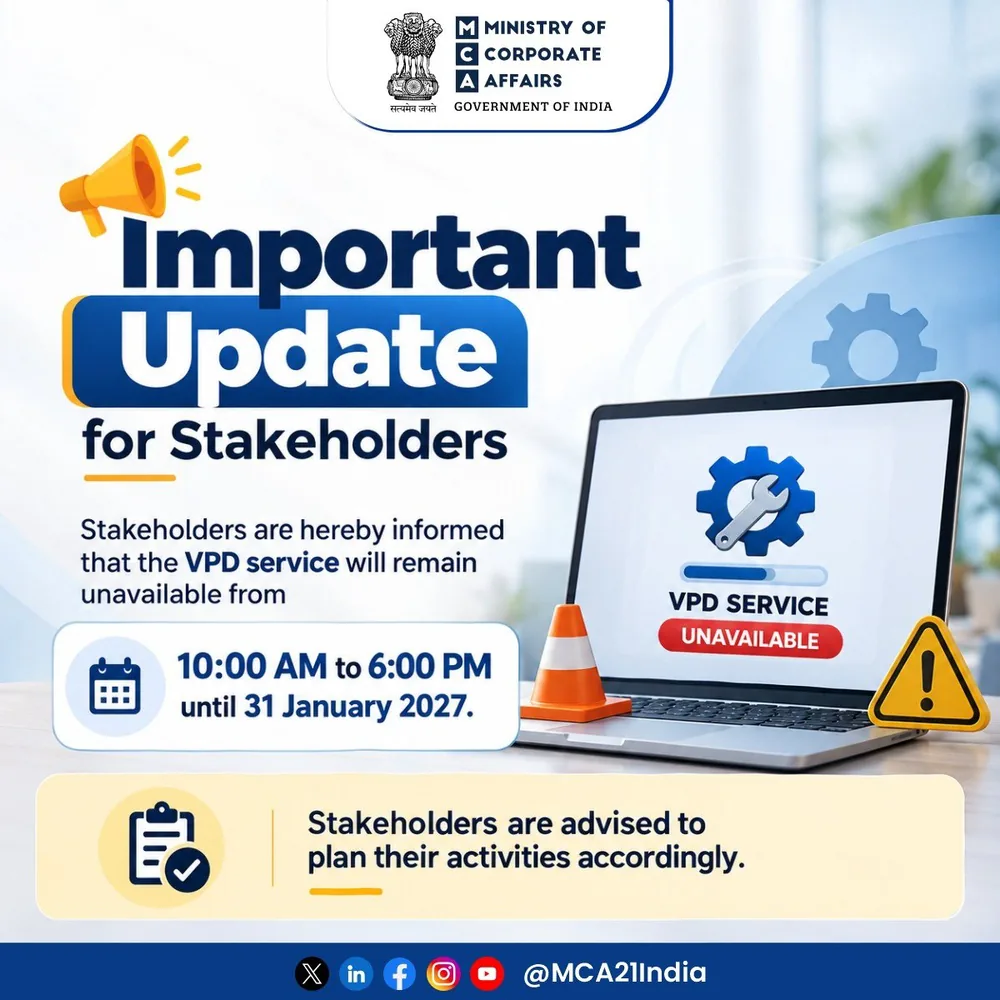
The notice is short enough to quote whole. Stakeholders “are hereby informed that the VPD service will remain unavailable from 10:00 AM to 6:00 PM until 31 January 2027”, and are “advised to plan their activities accordingly”.
Three things it does not say are worth noticing as much as the sentence that is there.
It gives no start date. The wording is “will remain unavailable”, which reads as a restriction already running when the notice went out on the afternoon of 27 October 2026.
It gives no reason. No maintenance window, no migration, no capacity note.
And it says nothing about the MCA India mobile app. That is a change from the last time. In December 2025 MCA ran a restriction of exactly the same shape, 10 am to 6 pm from 19 to 31 December, and that notice went out of its way to add that the service “will remain accessible via the ‘MCA India’ Mobile App during this period”. This one carries no such line. Read that as silence rather than as a closure, and check the app yourself before you build an afternoon around it.
What it looks like on your screen
There is no banner on the menu saying “closed until 6 pm”, which is why this sends people hunting through browser settings.
What we saw on 27 October 2026, checking the portal through the restricted hours, was both of the symptoms people search for. The View Public Documents entry can simply be absent from the MCA Services menu, so the path described in our guide to downloading MCA documents, MCA Services, then Document Related Services, then View Public Documents V3, stops one level short. And a route that does open can come back with a generic technical error rather than a maintenance message.
Both are the same thing underneath. A service that is switched off can be hidden or it can fail; which one you get depends on where you entered.
So is it you, or is it MCA?
Before you spend an hour on it, run the clock test.
Look at the time. If it is between 10 am and 6 pm IST on any day, assume the restriction and stop debugging. Clearing cookies, switching to Chrome, opening an incognito window and creating a second MCA account will each take you fifteen minutes and none of them will reopen the service.
Try the same route after 6 pm. If the menu item is back and the search works, you have your answer and there is nothing to report.
If it is still broken in the evening, then it is worth treating as a genuine fault: check that you are signed in, because the document route needs an MCA user account, and raise a ticket on the portal if it persists.
What still works between 10 am and 6 pm
The notice names one service. The rest of MCA21 is not covered by it, and the free layer is where most quick questions actually get answered.
| What you want | Where it lives | Open during the day |
|---|---|---|
| Status, incorporation date, registered state | Company master data | Yes |
| Authorised and paid-up capital | Company master data | Yes |
| Directors and signatories | Company master data | Yes |
| Index of charges, the loans secured on the company | Master data, separate menu item | Yes |
| Annual accounts, annual return, charge documents, the MoA | View Public Documents | No, 6 pm to 10 am |
| Filing a form | The form services | Not covered by the notice |
If the question is “does this company exist, and what does the register say about it today”, you do not need the paid service at all. The two-minute reality check runs entirely on the free layer, and so does reading the company’s CIN for its class, state and year of registration.
If the question is “what did they actually earn” or “who has a claim on their assets”, you need the documents, and the documents are behind the closed door until six.
If you have already paid
This is the case worth being careful about, because MCA’s access windows keep running whether the service is open or not.
A paid company sits in your Workspace with an expiry shown on its row. There are two clocks: the days you have to come back and view, and a much shorter one measured in hours that starts the moment you begin downloading files for that company. The second is the one that catches people out, and the restricted hours make it worse, because an afternoon purchase can only be downloaded in the evening.
Three rules follow.
- Read the expiry MCA shows in Workspace. Do not calculate it from when you paid, and do not assume the restricted hours extend it.
- Do not start a download you cannot finish. Work out the full list of what you want first, then start, with the whole evening in front of you rather than twenty minutes of it.
- Do not pay twice. If a payment is not reflected in Workspace, check the order’s status and its reference first. A gateway confirmation on its own does not establish that MCA has made the documents available.
What this does not tell you
The announcement is a post on MCA’s verified account, not a circular with a number you can cite in a file note. It carries no reason, no start date and no undertaking that the hours will not change again before January. The December 2025 restriction ran for under a fortnight; this one is scheduled for three months, and the Ministry has been steadily moving services onto V3, so the shape of it may move again.
There is also a quieter cost that has nothing to do with uptime. A register whose documents are reachable for sixteen hours of the day is still a register you can read. But it pushes the reading into the evening, and a document request made at three in the afternoon now lands in a queue rather than on your screen. If you are checking a counterparty against a deadline, that is a day of slack you no longer have.
What to do with it
- Between 10 am and 6 pm, stop debugging and start with master data.
- Decide in the afternoon exactly which categories you need, so the evening is spent downloading rather than browsing. If it is the accounts you are after, where the revenue figure actually sits is worth reading first.
- Pay and download in the same evening session where you can, so the shorter clock does not run out overnight.
- Put a reminder at 6 pm rather than returning hopefully at four.
- Check MCA’s own notices before 31 January 2027, because the hours are the Ministry’s to change.
Or hand the waiting to someone whose job is to sit in the queue. Entiva takes the order whenever you place it, fetches the available filings inside MCA’s own hours, and emails you when the documents are ready, which means the eight closed hours cost you an evening rather than a day.
Written by the team at Entiva, which retrieves and verifies MCA filings.
Frequently asked
Why has View Public Documents disappeared from the MCA portal?
MCA announced on 27 October 2026 that the VPD service will remain unavailable from 10:00 AM to 6:00 PM until 31 January 2027. During those hours the menu item can be absent and routes that do open can return a technical error. It is a scheduled restriction, not a fault at your end.
What time is MCA's View Public Documents available?
Outside 10 am to 6 pm IST, on MCA's announcement of 27 October 2026. That leaves the evening and the night, from 6 pm until 10 am the next morning. MCA can change this, so check its notices and its own screens rather than treating the hours as fixed.
How long will this last?
MCA's notice says until 31 January 2027. The Ministry gave no reason and no start date in the post, and the service was already restricted when the notice appeared on 27 October 2026.
I get a technical error on View Public Documents. Is it my browser?
Between 10 am and 6 pm IST, probably not. Clearing the cache, switching browsers or trying incognito will not reopen a service MCA has closed for the day. Try the same route after 6 pm before you raise a ticket.
I have already paid ₹100 for a company. Have I lost it?
Your Workspace entry carries its own expiry, which MCA shows on the company's row. Check that expiry rather than assuming. The shorter clock, the one measured in hours, starts when you begin downloading, so do not start a download you cannot finish inside the open hours.
Does the MCA India mobile app still show public documents?
The notice of 27 October 2026 says nothing about the app. When MCA restricted VPD in December 2025 it said explicitly that the service would stay accessible through the MCA India mobile app, and this notice carries no such line. Do not plan around the app without checking it.
Is the whole MCA portal down?
No. The notice names the VPD service. Company master data, the index of charges and form filing are separate services and are not covered by it.