How to download MCA documents from the V3 portal
Download MCA public documents from the V3 portal: fees, steps after payment, access windows and how to open .OCT files and PDFs.
Have a company in mind? Check it now.
Search the register free to see its status. Then order its filings to see who runs it, what it earns and what it owes.
We could not reach Entiva.
Check your internet connection and search again. Or ask us about and a person will answer you.
To download a company’s filed documents from the Ministry of Corporate Affairs (MCA), sign in at mca.gov.in, open MCA Services → Document Related Services → View Public Documents V3 → View Public Documents, search by company name or Corporate Identity Number (CIN), select the company and pay the document-viewing fee. After payment, open Workspace, in the same View Public Documents V3 menu, to find the paid company, choose a category and download its listed files. MCA charges ₹100 per company; basic company master data is free to inspect.
One thing to check before you start: on 27 October 2026 MCA announced that the View Public Documents service would be unavailable from 10 am to 6 pm IST until 31 January 2027. If the menu item is missing or returns an error during the day, that is why, and the restricted hours are covered here.
The steps below cover the filing list, the download window and the files you receive. If you want the available filings collected and organised for you, see Entiva’s document service and pricing.
First, the part that costs nothing
Before you pay for anything, a surprising amount of it is free.
One caveat on the mechanics, because MCA moves things: parts of the V3 portal that were once open have been going behind a sign-in. An MCA user account is free to create either way, so what follows is free in the sense that matters, even if you are asked to log in for some of it.
Go to mca.gov.in, and under MCA Services look for Master Data. A search by company name or CIN returns the company’s current status, its date of incorporation, its registered office state, its authorised and paid-up capital, its directors, and, under a separate menu item, its index of charges: the list of loans secured against its assets.
If you are checking whether a company exists, what status the register shows, and when it was incorporated, you may not need a paid filing. The two-minute reality check runs entirely on this free layer.
Master data does not give you the filed financial statements, annual returns or the underlying charge documents. For those, use the paid document service. See what you can find in each document category.
The paid route, step by step
The service is called View Public Documents, and on the V3 portal it lives at MCA Services → Document Related Services → View Public Documents V3 → View Public Documents. You need an MCA user account and must be logged in to view documents after payment.
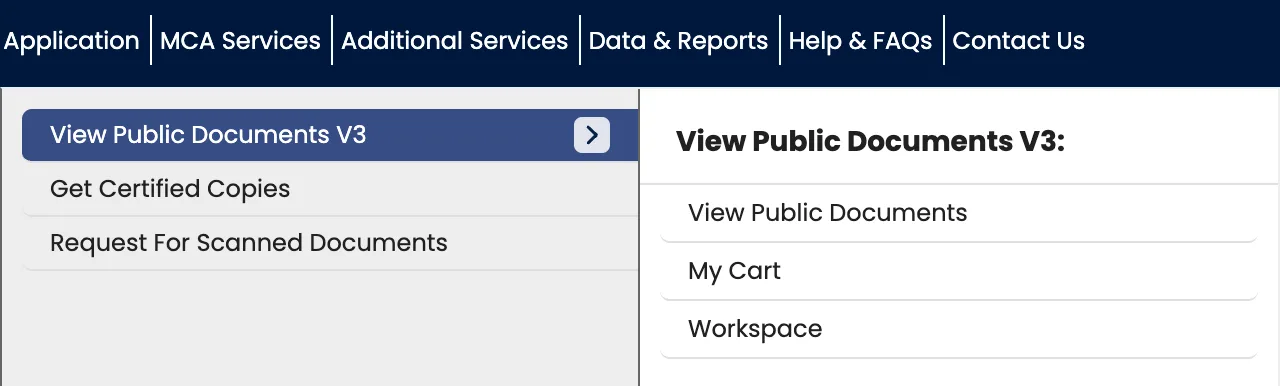
From there the flow is:
- Search for the company by name or CIN and select it from the results.
- Pick one document category and, optionally, filter by year. There are eight categories and you can only choose one at a time. Hold that thought.
- Add the company to your cart. Note the wording: you add the company, not the documents. This is the point at which the fee attaches.
- Check the fee and pay. MCA may hand the payment to BharatKosh. Keep the service request number (SRN) or payment reference displayed for your order.
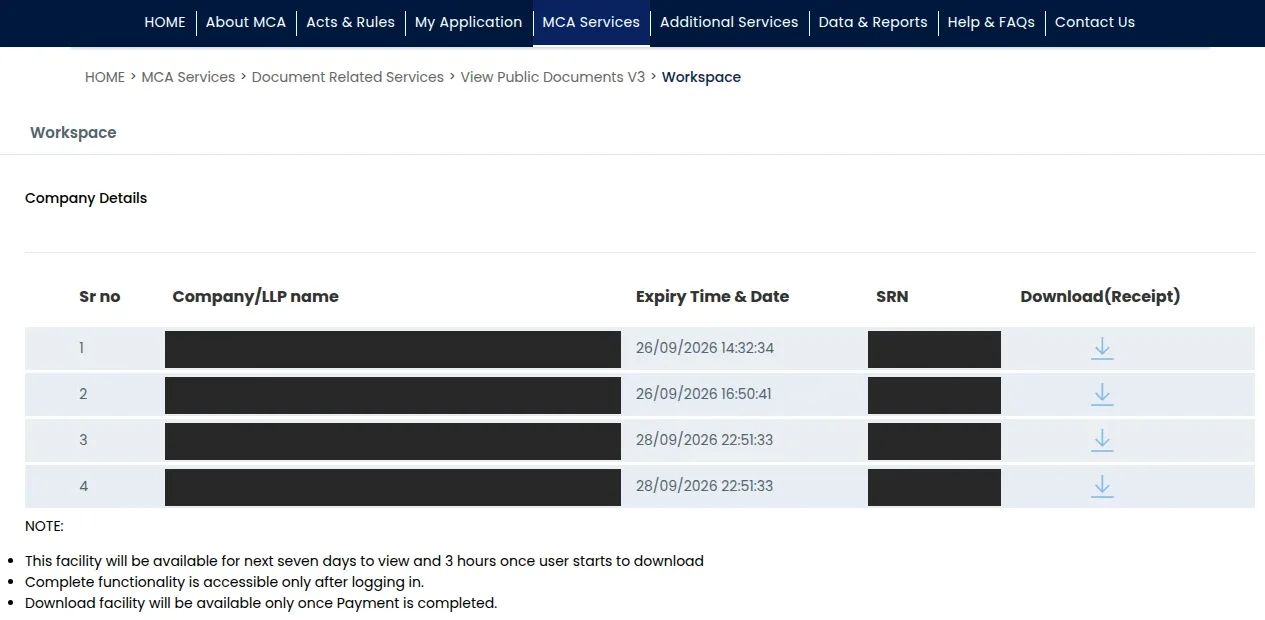
- Go to Workspace. Find the paid company, select its name, choose a document category and select the files you need.
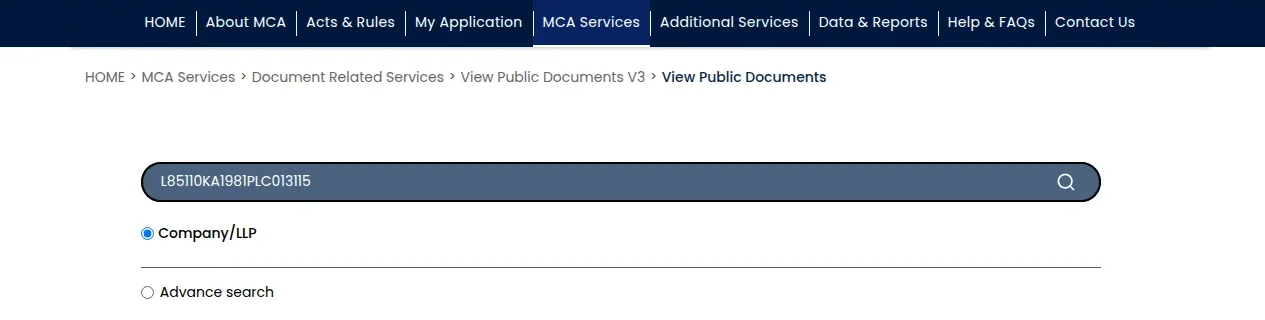
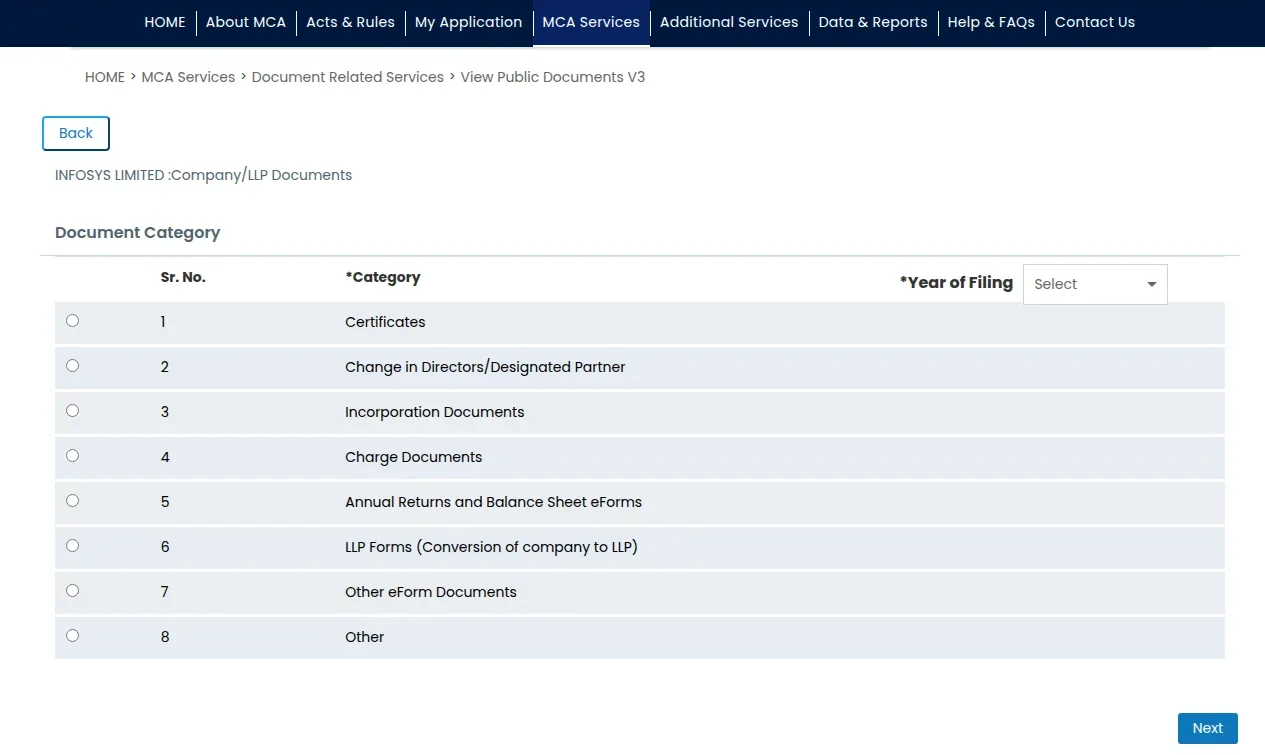
The MCA fee is ₹100 per company, rather than per document. The payment gives access to the public documents MCA lists for that company during its access window; it does not mean every year or category has a filing.
Or skip the portal. Entiva gets the same documents for ₹149 per company or ₹79 per LLP. That price covers MCA’s fee, so there is nothing more to pay, and you do not need an MCA account, a BharatKosh payment or a three-hour download window. You receive all eight document categories as checked, readable PDFs. The company page sets out what the filings record: financial figures year by year, directors and shareholding, and charges. Beside them are any insolvency notices from the Insolvency and Bankruptcy Board of India (IBBI), MSME payment claims, GST registrations and provident fund (EPFO) records found for the company. You can ask questions about the filings, and each answer points to the document it came from. See pricing.
After payment, find the documents in Workspace
Sign in to the same MCA account and open Workspace. Find the company and check the expiry shown on its row. Select the company’s name to reach its document categories, then choose a category and review the filing dates and descriptions before selecting files. The list may have more than one page. If a successful payment is not reflected there, check the order’s status and reference before attempting another payment. A payment gateway confirmation alone does not establish that MCA has made the documents available.
Know the limits before the first download
MCA’s older V2 help guide describes the Workspace route and access windows; it is historical guidance, not proof of today’s V3 screens. We checked the V3 route in September 2026: its download page stated the five-document selection limit, seven days in Workspace and a maximum of three hours after the first download begins. MCA can change the steps, so use the expiry and instructions shown in your account.
Five documents at a time. Not five per session, five per selection. A company with twenty filings in one category is four rounds of tick, download, wait, tick again.
Seven days of access after payment. Check the expiry displayed in Workspace rather than calculating it from when you first downloaded a file.
Three hours once you start. The V3 page says the shorter window starts when you begin downloading documents for that company. Plan the files you want before starting and follow the expiry shown in Workspace.
The practical consequence: work out the full list of what you want before you download anything at all. Browse the categories, note what is there, and only then start pulling.
How to open MCA .OCT files and PDFs
For older filings delivered as .OCT files, MCA advises extracting them
locally with 7-Zip.
The V3 download page also says to extract .OCT files and open the PDFs with
Adobe Acrobat. A download may instead arrive as a ZIP archive containing PDFs.
Check the file you received and extract the archive before opening its PDFs.
An archive is not always the last layer to unpack. Some eForm PDFs contain another file inside the PDF itself, which may not appear as a separate file in the archive. If the form names an attachment that you cannot find, check how to open embedded PDF attachments.
The eight categories, and why they matter
MCA presents documents by category. Check each relevant category if you need a broad set of filings.
| # | Category | What is in it |
|---|---|---|
| 1 | Incorporation Documents | The MoA, the AoA, and the forms that created the company |
| 2 | Annual Returns and Balance Sheet eForms | AOC-4 and MGT-7, with the audited accounts attached |
| 3 | Change in Directors/Designated Partner | Every appointment, resignation and change, dated |
| 4 | Charge Documents | Charges created, modified and satisfied over the company’s assets |
| 5 | Certificates | Certificates the registrar issued against the company’s filings |
| 6 | LLP Forms (Conversion of company to LLP) | Only where a company converted into an LLP |
| 7 | Other eForm Documents | Capital changes, office shifts, resolutions, the long tail |
| 8 | Other | Attachments the registry does not slot anywhere else |
Most questions live in two of these. If you want to know what the company earns, you want category 2, and the accounts are an attachment to the AOC-4 that the document list can show as its own row under that form name, which is why finding a private company’s revenue is more fiddly than it sounds. If you want to know who has a claim on its assets, you want category 4.
What a real document list looks like
Here is one document list observed for a small private company in category 2. It illustrates the different rows a single form can produce:
| Date filed | Form | What it is | Pages |
|---|---|---|---|
| 28/01/2025 | MGT-7A | Form MGT-7A | 13 |
| 28/01/2025 | MGT-7A | List of Directors | 1 |
| 28/01/2025 | MGT-7A | List of share holders, debenture holders | 1 |
| 28/01/2026 | AOC-4 | Copy of Financial Statements (incl. Board’s/auditor’s report) | 26 |
| 28/01/2026 | AOC-4 | Form AOC-4 | 23 |
| 28/01/2026 | MGT-7A | Form MGT-7A | 15 |
| 28/01/2026 | MGT-7A | List of share holders, debenture holders | 1 |
| 28/01/2026 | MGT-7A | Photograph of registered office | 1 |
| 28/01/2026 | EDIRECTOR | e-Director’s Report | 11 |
Nine documents, one category, one company. At five per selection that is two rounds. The list tells you, before you have opened a single file: both years were filed on the same day in January, the shareholder list is one page, and somebody photographed the registered office because the form asked them to.
This example cannot establish whether the company has a registered charge. Check the separate index of charges and the relevant document category before drawing that conclusion.
If the document is missing or the download fails
A missing filing and a failed download need different checks. If no row appears, confirm the CIN, category, year filter and any additional list pages. An empty result only describes what that view shows; it does not establish why a filing is absent. If a listed file will not download, keep its description and the order reference, then try again while MCA still shows access. If Workspace shows that access has expired, do not assume that another download attempt will restore it.
Check before paying again, because paying twice is common. About 1 in 40 company purchases on MCA is the same person buying a company they had already paid for recently. Nearly 4 in 10 of those repeats come within an hour of the first payment, and two-thirds within a day, which looks far more like a payment or download that seemed to fail than a deliberate second purchase. Occasional buyers are hit hardest: for people buying a single company, roughly 1 purchase in 12 is a repeat, against under 1 in 100 for people buying hundreds. In our own orders, MCA has shown a completed payment as incomplete for up to two days before catching up. If your account has been debited, do not pay again yet, even if Workspace does not show the company. MCA emails a payment confirmation to the address on your MCA account, and in our orders it has taken anywhere from a few minutes to nearly two hours to arrive, usually about half an hour. Wait for that email, check the payment reference, and if it still has not appeared, contact MCA support before you pay a second time.
These checks do not guarantee recovery. Keep the payment reference and the message MCA shows so its helpdesk can distinguish an order problem from a missing filing or a file error.
What this route will not do for you
It will not tell you the company is honest. The register holds what was filed; a download does not verify whether the statements are true. Filings run months behind the events they describe.
It will not fill a gap in the list. If you cannot see accounts for a year, check the year filter, all result pages and the relevant category first. A missing row is not proof that the company never filed. If MCA’s list confirms no filing for that period, record that limited finding.
It is not a certified copy. View Public Documents is separate from MCA’s Get Certified Copies service. Check which form of record the recipient requires.
The fee is per company. Checking five suppliers means checking five separate companies and paying MCA’s document-viewing fee for each one whose filings you need.
What to do with all this
- Do the free checks first. Status, incorporation date, and the index of charges cost nothing and answer most questions. Pay only when they do not.
- Confirm the entity by CIN before you pay. Near-identical names across states are common, and ₹100 spent on the wrong company is ₹100 gone.
- Decide what you need before you click download. The three-hour clock starts on the first file, not the first page.
- Check all relevant categories if you need a broad view of the filings.
- Keep the originals. Extract the .OCT, keep the PDFs, and note the date you retrieved them. A filing you can produce later is worth more than a summary you cannot source.
- If the answer has to be defensible, consider whether you need the certified route instead.
When to do this by hand, and when not to
MCA is the official source either way. Collecting a broad set yourself means checking relevant categories, downloading no more than five documents at a time, opening the archives and working within MCA’s download window.
If all you need is a company’s name, status, incorporation date or state, check the free master data first. If you need the available filed documents, Entiva’s document service retrieves and organises them from MCA. See what the service covers and its price.
Either way, the documents are public and the register is open. The only real question is whose afternoon it is.
Written by the Entiva team, who retrieve MCA filings for a living and have lost more than one afternoon to the three-hour clock.
Frequently asked
Is it worth collecting MCA documents by hand?
MCA gives you the official public filings and you can collect them yourself. You may need to search several categories, download in batches of up to five documents, and extract .OCT archives. Entiva can retrieve and organise the available filings if you need help with that work. If you only need company master data, check the free register first.
How much does it cost to download a company's documents from MCA?
MCA's View Public Documents fee is ₹100 per company. It is charged per company, not per document. Check the fee shown by MCA before paying.
Why are my downloaded MCA documents .OCT files instead of PDFs?
MCA says downloads with a .OCT extension should be extracted with a compression tool such as 7-Zip, then opened with Adobe Acrobat. Check the file you received: downloads can also arrive as ZIP archives containing PDFs.
How long do I have to download MCA documents after paying?
Seven days to view from the date of purchase, and a maximum of three hours from the moment you start downloading the first document for that company. The three-hour clock is the one that catches people out.
Do I need an MCA account to download company documents?
MCA requires you to sign in to view documents after payment. Basic company master data carries no document-viewing fee.
Can I get MCA documents without an MCA account?
Yes. Entiva retrieves a company's MCA filings for ₹149 per company or ₹79 per LLP, with MCA's fee included and nothing more to pay. You get all eight document categories as checked PDFs. You also get a company page showing the financial figures, directors, shareholding and charges where the filings record them, beside any insolvency, MSME payment claim, GST and provident fund records found for the company.