How to ask ChatGPT or Claude about an Indian company's MCA filings
What ChatGPT or Claude can and cannot tell you about an Indian company from its MCA filings, why answers should cite the filing, and how to connect yours.
Have a company in mind? Check it now.
Search the register free to see its status. Then order its filings to see who runs it, what it earns and what it owes.
We could not reach Entiva.
Check your internet connection and search again. Or ask us about and a person will answer you.
You have a supplier’s filings open. Forty PDFs, ten years of them, and a question you need answered by this afternoon: has this company borrowed against its assets, and did its revenue fall last year? You paste the company’s name into ChatGPT or Claude. It answers in seconds, fluently, with numbers.
Here is what you do not know yet: where those numbers came from.
An assistant asked about a company it cannot see answers from memory, and its memory is a blur of whatever it read in training. The answer may be right. It may belong to a company with a similar name. It may be three years old. Nothing in the reply tells you which, and nothing in it lets you check.
This guide is about closing that gap: what an assistant can honestly tell you from a company’s filings with the Ministry of Corporate Affairs (MCA), what it cannot, and how to make it read the filings rather than recall them.
Why an answer from memory is not an answer about the company
If you searched for “can ChatGPT read MCA filings”, the short version is this: it can read a filing you give it, and it cannot read one you do not. Everything else it says about an Indian company is recollection.
Think of it as the difference between a colleague who has the file open and one who once heard about the company at a conference. Both may sound sure. Only one can turn the page and show you the line.
Three things go wrong with recollection, and all three matter for a decision about money:
- It has a date. A model’s training stops somewhere. A charge registered last quarter, a director who resigned in the spring, a year of accounts filed last month: none of it is in the model’s memory.
- It confuses names. Indian company names often differ by a word or two from another company’s. The register tells them apart by the Corporate Identity Number (CIN), the 21-character code every company carries, and a CIN is worth reading properly. Memory tells them apart by whatever it happens to recall.
- It cannot cite. An answer with no filing behind it has no form, no date and no document you could open to check it. You cannot put it in a credit note or a diligence memo, because nobody can trace it.
The fix is not a better prompt. It is giving the assistant the documents.
The filings are public. Reading them is the work.
Section 399(1)(a) of the Companies Act, 2013 says that, save as otherwise provided in the Act, “any person may” inspect by electronic means “any documents kept by the Registrar”, on payment of the prescribed fee. On the MCA portal that fee is ₹100 per company, and downloading the documents yourself is something anyone with an MCA account can do.
What you get is a pile of forms. Annual accounts, annual returns, charge filings, director appointments, each in its own PDF, some with the substance attached rather than on the visible pages. Each form answers a different question (a private company’s revenue, for instance, sits in the accounts), and some answers sit inside a document embedded in the PDF that an ordinary viewer will not show you.
That is the part an assistant is genuinely good at: reading forty documents faster than you can, finding the one that answers the question, and quoting it. It is only good at it if it is reading the documents.
What an assistant can tell you from the filings, and what it cannot
| Question | Can the filings answer it? | Where the answer sits |
|---|---|---|
| What revenue did the company report for a year? | Yes, if accounts for that year were filed | The financial statements filed with the annual accounts |
| Has it borrowed against its assets? | Yes, for charges that were registered | Charge filings, and the register record of charges |
| Who were its directors, and when did that change? | Yes, as filed | Director appointment and resignation filings, the annual return |
| Who held its shares? | At the date of each annual return | The shareholder list, often an attachment to the annual return |
| Are the reported figures true? | No | A filing records what the company told the registrar |
| What has happened since the last filing? | No | The register lags events; nothing filed means nothing to read |
| What did its board decide about borrowing? | No | Private companies do not file these resolutions; for public companies, section 117(3)(g) bars their inspection |
The last three rows are the ones to keep in mind. The proviso to section 117(3)(g) of the Act says that no person shall be entitled under section 399 “to inspect or obtain copies of such resolutions”, meaning the board resolutions listed in section 179(3), which include those on borrowing, investing and lending. A private company does not file them at all; a public company files them, and they are closed to you and to any assistant you point at the file.
The register is a diary, not a mirror. An assistant reading it faithfully will tell you what was written down and when. It cannot tell you what is true today, and a good answer will say which filing it is relying on so you can judge how old that is.
How to ask so the answer comes from the filing
Once your assistant can read a company’s filings, how you ask still decides how useful the answer is. Four habits help.
- Name the company by its CIN. “The company with CIN [CIN]” leaves no room for a namesake.
- Ask for the citation in the question. “Quote the filing, its form and its date for each figure” turns a fluent paragraph into something you can check.
- Ask for the gap. “Which years have no accounts filed?” is as useful as “what was revenue in each year”, and an assistant will not volunteer it unless asked.
- Open the filing it cites before you rely on it. The citation is there so you can. The judgement on what a filing means for your decision stays yours.
A good first question looks like this: “For the company with CIN [CIN], list every charge registered against it, with the lender, the amount and the filing each one comes from. Then tell me which have a satisfaction filed.”
Connecting your own ChatGPT or Claude to the filings you hold
If you hold companies on Entiva, you can now let your own assistant read them. You can share the setup guide with someone who needs these instructions. The screenshots below were checked on 9 October 2026.
Set it up in ChatGPT
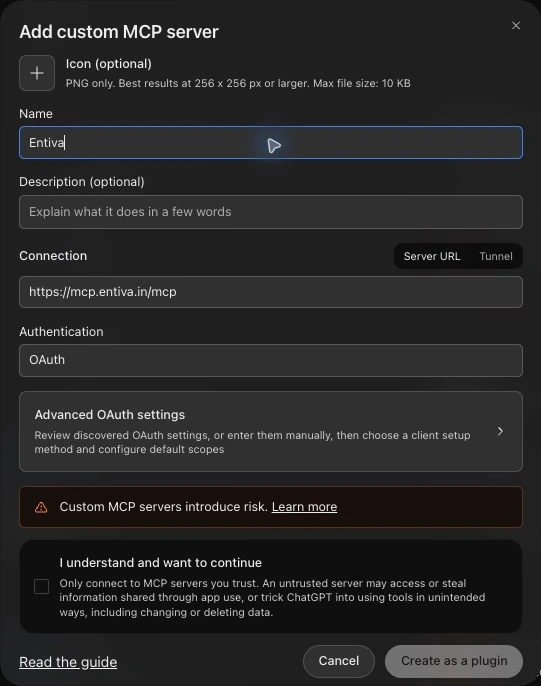
- Open Plugins in ChatGPT, choose Add, then Add custom MCP server. MCP is the standard the assistant uses to connect to outside sources.

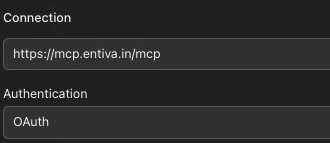
- Enter Entiva as the name and
https://mcp.entiva.in/mcpas the server URL. Leave Authentication set to OAuth. - Read the notice, select I understand and want to continue, then choose Create as a plugin.
Set it up in Claude
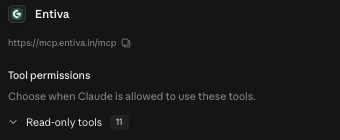
- Open Connectors in Claude from Customize.
- Choose Add connector, then Add custom connector. Name it Entiva
and enter
https://mcp.entiva.in/mcpas the server URL. - Connect it, sign in to Entiva and approve access.
Claude Free allows one custom connector. If you already have one, you will need to remove it or use an account that allows more connectors.
Approve access and ask your first question
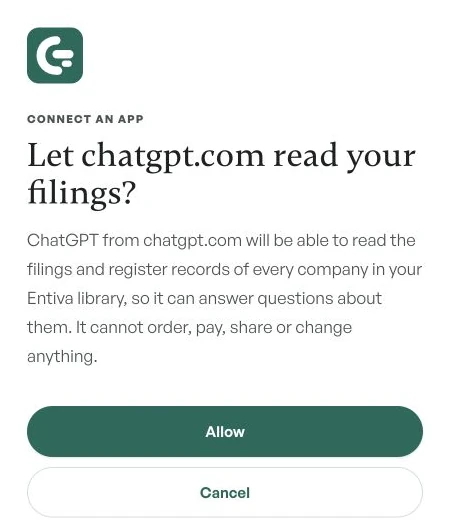
Both assistants send you to Entiva to sign in with your usual login and approve the connection. Check which assistant is asking for access, then choose Allow if you want it to read the filings you hold.
Return to your assistant and try: “Using Entiva, which companies are in my library?” Then ask about a company by CIN and request the form and date behind each answer.
Once connected, the assistant can search and read the filing text, the fields of the eForms, the tables inside the filings, the MCA register record as last read for that company, and a director’s other companies among the records held. It can cite the filing behind each answer: the form and its date.
Four limits, stated plainly:
- It reads only the companies you hold. It cannot reach a company you have not retrieved, and it cannot fetch one for you.
- It is read-only. It cannot order, pay, share or change anything.
- The filing text it reads goes to your assistant’s provider, OpenAI or Anthropic, under your own account with them. Check that account’s terms before you connect filings you would rather not send.
- It reads the record; it does not vouch for it. A cited answer tells you what the filing says, not whether the filing is right.
There is no extra charge for the connection, and you can disconnect it at any time from your settings.
What to do before your next question
- Decide what you are trying to find out, and which filing would answer it.
- Make sure you hold that company’s filings, and that the category you need is in the set. What a filing set contains tells you where to look.
- Ask by CIN, ask for citations, and ask what is missing.
- Open the cited filing for anything you will act on, and check the company is real before you rely on any of it.
An assistant that reads the filings will save you hours. One that remembers them will save you minutes and cost you the ability to check its work.
Entiva retrieves a company’s public MCA filings and lets you search and question them, in the app or from your own ChatGPT or Claude.
Frequently asked
Can ChatGPT or Claude look up an Indian company's MCA filings on its own?
Not reliably. Without the filings in front of it, an assistant answers from what it learnt in training, which may be out of date, may mix up companies with similar names, and cannot point you to the filing behind a figure. Ask it about filings it can actually read, and ask it to cite each one.
What can an AI assistant tell me from a company's MCA filings?
What the company filed: the figures in its accounts, the charges registered against it, who was appointed or resigned as a director, who held shares at the date of an annual return, and when each form was filed. It cannot tell you whether a filing is true, what has happened since the last filing, or anything the company never filed.
How do I connect Entiva to Claude or ChatGPT?
In Claude, open Customize, then Connectors, then Add connector and Add custom connector, and enter https://mcp.entiva.in/mcp. In ChatGPT, open chatgpt.com/plugins, choose Add, then Add custom MCP server, and use the same address with OAuth authentication. Sign in with your Entiva login and approve the connection. Claude Free allows one custom connector.
Can the assistant order filings or spend money once connected?
No. The connection is read-only. It reads the companies you already hold on Entiva and cannot order, pay, share or change anything. You can disconnect it at any time from your Entiva settings.
Where does the filing text go when my assistant reads it?
To the assistant's provider, OpenAI for ChatGPT or Anthropic for Claude, under your own account with them. The terms of that account apply to it, so check them before you connect filings you are not comfortable sending.